Best AI Notetakers for Multilingual Teams in 2026
Publicado em Jul 13, 2026

Índice
Imagine you’re leading a global sales team. Your calendar is packed with customer demos, internal syncs, and partner meetings. By the end of the day, you’ve spoken to people from five different countries and three different time zones. Keeping up with every conversation is hard enough. Keeping accurate notes when everyone speaks different languages feels almost impossible.
Your meeting includes teammates speaking English, Japanese, and Vietnamese. Everyone leaves with the same transcript — but not everyone leaves with the same understanding.
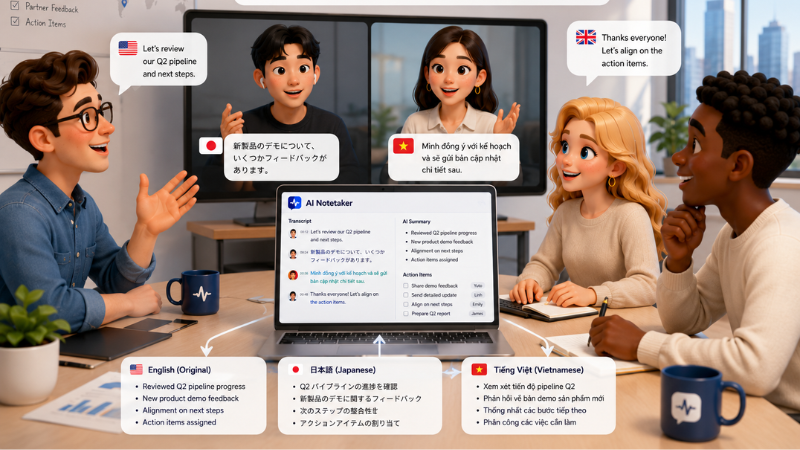
That’s why AI notetakers have become an essential tool for global teams. But here’s the catch: supporting multiple languages isn’t the same as helping everyone understand each other.
In this guide, we’ve compared the 5 best AI notetakers for cross-language teams — scored on language support, live translation, AI summaries, security, and workflow integrations — to help you choose the right solution.
Key Takeaways
- Modern AI notetakers automatically transcribe meetings generate summaries identify speakers capture action items and keep meeting notes organized in one place.
- Most AI notetakers support multilingual transcription but only a few can translate conversations in real time for multilingual teams.
- The best AI notetaker depends on your team’s workflow language requirements integrations and security needs rather than transcription accuracy alone.
- We compared the 5 best AI notetakers for multilingual teams based on AI capabilities real time translation pricing security and ease of collaboration.
1. Tengos
Best for: AI Meeting Summaries for Multilingual Teams
If your team spends more time reviewing meeting notes than acting on them, Tengos is one of the strongest AI notetakers to consider. It goes beyond transcription by automatically generating structured AI meeting summaries, capturing Live Highlights during meetings, identifying key decisions, and extracting action items so teams can quickly understand what happened without reading the full transcript.
Tengos also supports real-time transcription and translation across 60+ languages, making it a great fit for global teams. Features like Transcript Terms improve transcription accuracy for brand names and technical term, while enterprise-grade security and flexible summary templates make it suitable for both internal meetings and customer calls.
Pros
- AI meeting summaries with multiple summary templates
- Live Highlights capture important moments in real time
- Auto Highlights identify key events automatically
- Summaries include key decisions and action items
- Real-time transcription and translation across 60+ languages
- Transcript Terms improve accuracy for brand names and technical jargon
- Supports uploaded audio and video files
- Multiple transcript export formats
Cons
- Smaller integration ecosystem than older competitors
- Some advanced features require higher-tier plans
Pricing
Free plan available. Paid plans start at $2.99/month (Lite plan, billed monthly).
2. Localingo
Best for: Bot-Free Real-Time Translation
If your priority is live translation without adding another meeting bot, Localingo is a solid option. It works alongside Zoom, Microsoft Teams, Google Meet, and other platforms to provide real-time translation, making multilingual conversations easier without changing your existing workflow.
Unlike more comprehensive AI notetakers, Localingo focuses primarily on live translation rather than AI meeting summaries or post-meeting collaboration features.
Pros
- Real-time translation across many languages
- Bot-free experience for major meeting platforms
- Simple setup with existing video conferencing tools
- Supports multilingual conversations without manual language switching
Cons
- Limited AI meeting summary features
- No publicly disclosed enterprise security certifications
Pricing
Free plan available. Paid plans start at $16/month.
3. Notta
Best for: Multilingual Transcription Accuracy
If your goal is creating highly accurate multilingual transcripts, Notta is one of the strongest options available. It supports transcription in 58 languages and performs particularly well with Asian languages, making it a popular choice for international businesses.
While Notta excels at transcription, it focuses less on live multilingual collaboration and real-time translation.
Pros
- Accurate transcription in 58 languages
- Strong support for Japanese Chinese and Korean
- AI meeting summaries and action items
- Supports audio and video transcription
Cons
- Live translation is a paid add-on
- Fewer collaboration features than some competitors
Pricing
Free plan available. Paid plans start at $8.17/month (billed annually).
4. Fireflies.ai
Best for: CRM Integration
Fireflies.ai is a great choice for sales and customer-facing teams that rely on CRM workflows. Beyond AI meeting summaries, it automatically syncs meeting insights with tools like Salesforce and HubSpot, helping teams reduce manual admin work.
Although it supports transcription in over 100 languages, Fireflies focuses on transcription rather than live translation.
Pros
- AI meeting summaries and action items
- Deep CRM integrations
- Searchable meeting library
- Supports transcription in 100+ languages
Cons
- No real-time translation
- Advanced workflow features require paid plans
Pricing
Free plan available. Paid plans start at $10/user/month (billed annually).
5. Otter.ai
Best for: Live Collaborative Notes
Otter.ai remains one of the most popular AI notetakers for teams that collaborate in real time. Its live transcripts allow participants to highlight discussions, leave comments, and review meeting notes together while the conversation is still happening.
The trade-off is language support, which is currently much more limited than other tools in this comparison.
Pros
- Live collaborative meeting notes
- AI meeting summaries and action items
- Shared highlights and comments
- Easy integration with Zoom Google Meet and Microsoft Teams
Cons
- Limited language support
Pricing
Free plan available. Paid plans start at $8.33/user/month (billed annually).
AI Notetakers for Multilingual Teams Comparison
| AI Notetaker Features | Tengos | Notta | Fireflies.ai | Otter.ai | Localingo |
|---|---|---|---|---|---|
| AI Meeting Summary | Yes | Yes | Yes | Yes | Basic |
| Summary Templates | Yes | No | No | No | No |
| Live Highlights | Yes | No | No | No | No |
| Auto Highlights | Yes | No | No | No | No |
| Key Decisions | Yes | Limited | Limited | Limited | No |
| Action Items | Yes | Yes | Yes | Yes | No |
| Speaker Identification | Yes | Yes | Yes | Yes | Yes |
| Custom Vocabulary | Yes | No | No | No | No |
| Real-Time Translation | Yes | Paid add-on | No | No | Yes |
| Upload Audio & Video | Yes | Yes | Yes | Yes | No |
| Enterprise Security | ISO 27001, SOC 2 ready, GDPR ready | SOC 2 ISO 27001 GDPR CCPA HIPAA | SOC 2, GDPR | SOC 2 | GDPR, UK GDPR and CPRA SOC 2 ready |
| Free Plan | Yes | Yes | Yes | Yes | Yes |
| Starting Price | $2.99/mo | $8.17/mo | $10/user/mo | $8.33/user/mo | $16/mo |
Which AI Notetaker Should You Choose?
- Choose Tengos if you want an all-in-one AI notetaker that combines AI meeting summaries, customizable templates, Live Highlights, action items, and real-time translation in a single platform.
- Choose Notta if your primary goal is highly accurate multilingual transcription, particularly for Asian languages.
- Choose Fireflies.ai if deep CRM integrations are more important than multilingual collaboration.
- Choose Otter.ai if your team mainly works in English and values live collaborative transcripts.
- Choose Localingo if your only requirement is bot-free real-time translation.
FAQs
What is an AI notetaker?
An AI notetaker automatically records meetings, generates summaries, identifies speakers, and captures key decisions and action items so teams can spend less time taking notes and more time following up.
What’s the difference between an AI notetaker and an AI meeting transcription tool?
An AI meeting transcription tool focuses on converting speech into text, while an AI notetaker goes a step further by generating meeting summaries, highlighting key decisions, and organizing action items automatically.
Can AI notetakers translate meetings in real time?
Only some AI notetakers offer real-time translation. Many platforms support multilingual transcription, but only a few can help participants understand each other live during the meeting.
Which AI Notetaker is best for multilingual teams?
Teams working across multiple languages should look for AI meeting summaries, real-time translation, automatic language detection, and customizable meeting templates. Tengos combines all of these features in a single platform.
Are AI Notetakers secure for business meetings?
Most enterprise AI notetakers offer security features such as SOC 2, ISO 27001, GDPR compliance, encryption, and role-based access controls to protect sensitive meeting data.
What should I look for when choosing an AI notetaker?
Look for accurate meeting summaries, action items, speaker identification, workflow integrations, security, and multilingual support. If your team works globally, real-time translation is another important feature to consider.
Whether you’re managing customer calls, internal meetings, or global collaboration, the right AI notetaker can save hours every week. If you’re looking for AI-powered meeting summaries with real-time multilingual support, Tengos is well worth trying.
Start using Tengos for free and see how much easier meeting notes can be! Try Tengos today!