Best AI Meeting Transcription Tools in 2026
ເຜີຍແຜ່ເມື່ອ Jul 9, 2026

ສາລະບານ
You wrap up a meeting feeling productive. Decisions were made, action items were assigned, and everyone seemed aligned. Then someone asks, “Can you send the meeting notes?”
Suddenly, you’re replaying the conversation in your head, digging through handwritten notes, or skimming an hour-long recording just to remember who agreed to what. Meanwhile, your next meeting is already starting.
That’s why AI Meeting Transcription Tools have become essential for modern teams. Beyond converting speech into text, today’s tools can generate summaries, identify speakers, extract action items, and even translate multilingual conversations in real time, turning meetings into searchable, actionable knowledge.
Roughly three out of four professionals now use one in their work meetings, according to Laxis’s State of Meeting Note-Taking 2026 roundup, which compiles figures from other industry surveys. This isn’t an early-adopter category anymore. It’s default infrastructure.
In this guide, we’ve reviewed the 7 best AI Meeting Transcription Tools in 2026 based on six practical criteria to help you find the solution that best fits your workflow.
Before you dive in
- The best AI Meeting Transcription Tools in 2026 go beyond transcription by generating summaries, action items, and searchable meeting records automatically.
- Most leading platforms now deliver highly accurate transcription, so integrations, AI capabilities, security, and multilingual support are the biggest differentiators.
- Teams should choose a tool based on their workflow, collaboration style, and whether they need compliance features, or real-time translation.
- In our comparison, we evaluated seven tools across six practical criteria to help you find the best fit for your business.
The 6-Criteria Framework This Comparison Uses
Before scoring any tool, here’s exactly what “best” means in this piece. Every tool below is evaluated on the same six axes.
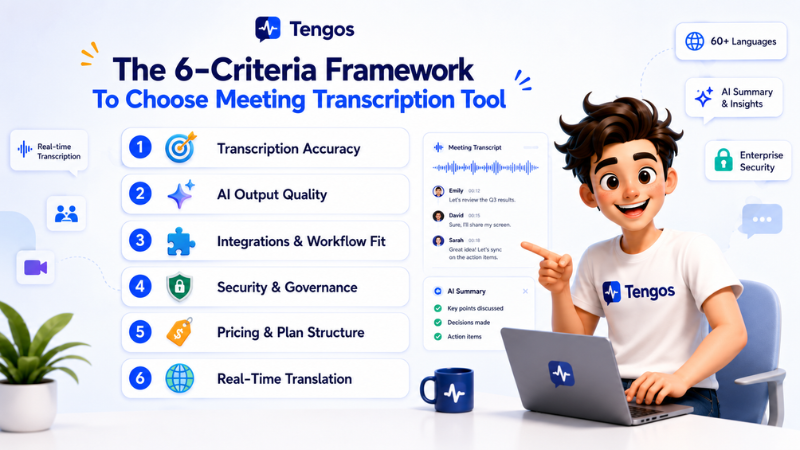
1. Transcription Accuracy
Table stakes in 2026, not a differentiator. If a tool can’t clear roughly 95% accuracy on clean audio, it doesn’t belong in this list. All seven tools below clear that bar — this is a pass/fail filter, not a ranking factor.
2. AI Output Quality
A transcript is raw material. What matters is whether the tool turns it into something usable — a summary, a set of decisions, action items with owners — without your team paying you back in cleanup time.
3. Integrations & Workflow Fit
Does the tool’s output land where your team already works — your CRM, your project tracker, your shared drive — or does it sit in a separate app nobody opens twice?
4. Security & Governance
Privacy is a leading reason businesses hesitate to expand AI note-taker use, and many users say they change what they say when they notice an AI bot on a call (Laxis roundup). That’s not a footnote. It gets a full column here.
5. Pricing & Plan Structure
What’s actually free, what requires a seat-based contract, and where the real cost shows up as your team scales.
6. Real-Time Translation
The criterion missing from every other 2026 comparison. Not “how many languages can it transcribe” — whether two people speaking different languages in the same meeting can understand each other as it happens, without a human interpreter and without waiting for a post-meeting export.
The 7 Best AI Meeting Transcription Tools in 2026, Compared
Search “ai notetaker” or “ai meeting transcription tools” and most of these seven names will show up somewhere. Here’s how each one actually holds up against all six criteria — including where it doesn’t.
1. Tengos
Best For
Global teams, international sales, customer support, and multilingual organizations.
Tengos is an AI Meeting Transcription Tool designed for multilingual teams. It combines real-time transcription, live translation, AI meeting summaries, speaker identification, and action item generation in one platform. Unlike most competitors, Tengos automatically detects language switches during conversations, allowing participants to communicate naturally without changing settings manually.
Pros
- Real-time transcription and translation across 60+ languages with 95% accuracy.
- Automatically detects language switching during meetings
- Provide custom terms such as brand names and technical jargon to improve transcription accuracy with transcript terms feature.
- AI-generated meeting summaries and action items
- Supports uploaded audio and video transcription
- Multiple transcript export formats
Cons
- Smaller integration ecosystem than older competitors
Pricing
Free plan available. Paid plans start at $2.99/month (Lite plan, billed monthly).
2. Fellow
Best For
Healthcare, finance, legal, and enterprise teams with strict compliance requirements.
Fellow is an AI Meeting Transcription Tool built for organizations that prioritize compliance, governance, and collaborative meeting management. With enterprise-grade security and AI-powered search, it’s a strong choice for regulated industries.
Pros
- AI meeting summaries and action items
- AI-powered meeting search with Ask Fellow
- Botless recording option
- SOC 2, GDPR, and HIPAA compliance
- CRM and productivity tool integrations
Cons
- No real-time translation
- Limited multilingual collaboration features
Pricing
Free plan available. Paid plans start at $7/user/month (Team plan, billed annually).
3. Fathom
Best For
Freelancers, startups, and small teams looking for a free AI meeting assistant.
Fathom is an AI Meeting Transcription Tool known for its generous free plan. It automatically records meetings, generates AI summaries, and extracts action items.
Pros
- Unlimited free meeting transcription
- AI summaries and action items
- Fast post-meeting recap
- Botless recording support
- Easy to use with Zoom, Google Meet, and Microsoft Teams
Cons
- Limited multilingual capabilities
- Fewer enterprise integrations
Pricing
Free plan available. Paid plans start at $16/month (Premium, billed annually).
4. Granola
Best For
Executives, consultants, founders, and Mac and Windows users who prefer bot-free meetings.
Granola takes a different approach by recording meetings directly from your computer instead of joining as a meeting bot. It combines personal notes with AI-generated transcripts and summaries, creating a more natural note-taking experience for individual professionals.
Pros
- Bot-free meeting recording
- AI-generated notes and summaries
- Clean, distraction-free interface
- Automatically combines personal notes with transcripts
Cons
- Free plan keeps only 30 days of meeting history
- No real-time translation
Pricing
Paid plans start at $14/user/month.
5. Fireflies.ai
Best For
Sales teams, customer success teams, and revenue operations.
Fireflies.ai is an AI Meeting Transcription Tool built around workflow automation. It automatically records meetings, creates searchable transcripts, generates summaries, and syncs meeting data with popular CRM and project management platforms.
Pros
- AI summaries and action items
- Searchable meeting library
- Supports transcription in 100+ languages
- Workflow automation with popular business tools
Cons
- No real-time translation
- Advanced features require paid plans
Pricing
Free plan available. Paid plans start at $10/user/month.
6. Otter.ai
Best For
English-speaking teams, educators, and organizations that collaborate heavily during meetings.
Otter.ai is one of the most established AI Meeting Transcription Tools, known for its live collaborative transcripts. Teams can follow conversations in real time, highlight important moments, add comments, and generate AI summaries immediately after meetings.
Pros
- Live collaborative transcription
- AI summaries and action items
- Integrates with Zoom, Google Meet, and Microsoft Teams
- Strong meeting collaboration features
Cons
- Limited language support
Pricing
Free plan available. Paid plans start at $8.33/user/month.
7. tl;dv
Best For
Remote teams, product teams, recruiters, and organizations working asynchronously.
tl;dv focuses on making meetings easy to review and share. Instead of only generating transcripts, it lets users get AI summaries and searchable meeting highlights, making asynchronous collaboration much more efficient.
Pros
- AI meeting summaries
- Transcription in 30+ languages
- Supports Zoom, Google Meet, and Microsoft Teams
- Searchable meeting library
- Works well for asynchronous collaboration
Cons
- No real-time translation
- Smaller integration ecosystem
Pricing
Free plan available. See tldv.io for current paid pricing.
Side-by-Side: All 7 Best AI Meeting Transcription Tools
| Tool | Best For | Languages | AI Summary | Real-Time Translation | Security | Starting Price |
|---|---|---|---|---|---|---|
| Tengos | Multilingual teams | 60+ | ✅ | ✅ | ISO 27001, SOC 2 Ready, GDPR | Free / $2.99 |
| Fellow | Compliance & enterprise | Multiple | ✅ | ❌ | SOC 2, GDPR, HIPAA (Enterprise) | Free / $7 |
| Fathom | Free meeting transcription | Not published | ✅ | ❌ | See vendor site | Free / $16 |
| Granola | Bot-free recording | Not published | ✅ | ❌ | See vendor site | $14 |
| Fireflies.ai | CRM-integrated sales teams | 100+ | ✅ | ❌ (Transcription only) | SOC 2, GDPR | Free / $10 |
| Otter.ai | Live collaboration | 6 (EN, ES, FR, DE, JA, ZH) | ✅ | ❌ | SOC 2 | Free / $8.33 |
| tl;dv | Async collaboration | Multiple | ✅ | ❌ | SOC 2, GDPR | Free / see vendor site |
How to Choose Between These 7 AI Meeting Transcription Tools
- Your team speaks more than one language regularly: Tengos is the only tool here built for that — everything else on this list will give you a transcript, not a translated conversation.
- You need the deepest compliance stack for a regulated industry: Fellow’s SOC 2 and GDPR coverage (HIPAA on Enterprise only) leads this comparison.
- You want a serious tool at zero cost: Fathom’s unlimited free tier is the strongest value here for English-speaking individuals and small teams.
- You’re worried about a visible bot changing how people talk: Granola’s bot-free, device-audio capture solves that directly — it works on Mac, Windows, and mobile.
- Your meeting notes need to land in Salesforce or HubSpot automatically: Fireflies’ CRM integration depth is unmatched in this set.
- You want a live, collaborative transcript your team can annotate together: Otter’s real-time shared transcript is still the strongest in that specific use case.
Ready to see how a meeting with more than one language actually reads in real time?
No credit card required. 2 hours of transcription and translation included every month.
FAQs
1. What are AI Meeting Transcription Tools?
AI Meeting Transcription Tools automatically convert spoken conversations into searchable text Most platforms also generate AI summaries identify speakers capture action items and integrate with business tools
2. What’s the difference between an AI notetaker and an AI Meeting Transcription Tool?
The terms often overlap AI notetakers focus on summaries and action items while AI Meeting Transcription Tools focus on creating accurate transcripts Most modern platforms provide both features
3. How accurate are AI Meeting Transcription Tools?
Leading AI Meeting Transcription Tools can achieve around 95% accuracy with clear audio Custom transcript terms can further improve recognition of brand names acronyms and technical terminology
4. Do any AI Meeting Transcription Tools translate between languages in real time?
Yes! But only a few. Most platforms support multilingual transcription without live translation Tengos stands out by providing both real time transcription and translation during meetings
5. Is transcription accuracy still the best way to compare AI Meeting Transcription Tools?
Not anymore Most leading platforms already offer highly accurate transcription Today integrations AI features security and multilingual support are more meaningful differentiators
6. Are there free AI Meeting Transcription Tools?
Yes! Many providers offer free plans with limited transcription minutes while paid plans unlock advanced AI features longer recordings and additional integrations
7. Which AI Meeting Transcription Tool is best for multilingual teams?
Teams working across multiple languages should look for real time translation automatic language detection multilingual speaker identification and AI summaries to improve collaboration like Tengos.