
Live Meeting Translation on Zoom, Meet, and Teams: Which Plans Are Paid? (2026)
Published on Oct 3, 2026
Table of Contents
Can you use live meeting translation on Zoom, Google Meet, and Microsoft Teams? Yes, but not for free. All three platforms offer live meeting translation through translated captions, but you need a paid plan or an extra purchase, and in most cases your organization has to buy it. A free personal account is not on the supported list in the official documentation of any of the three.

Quick summary
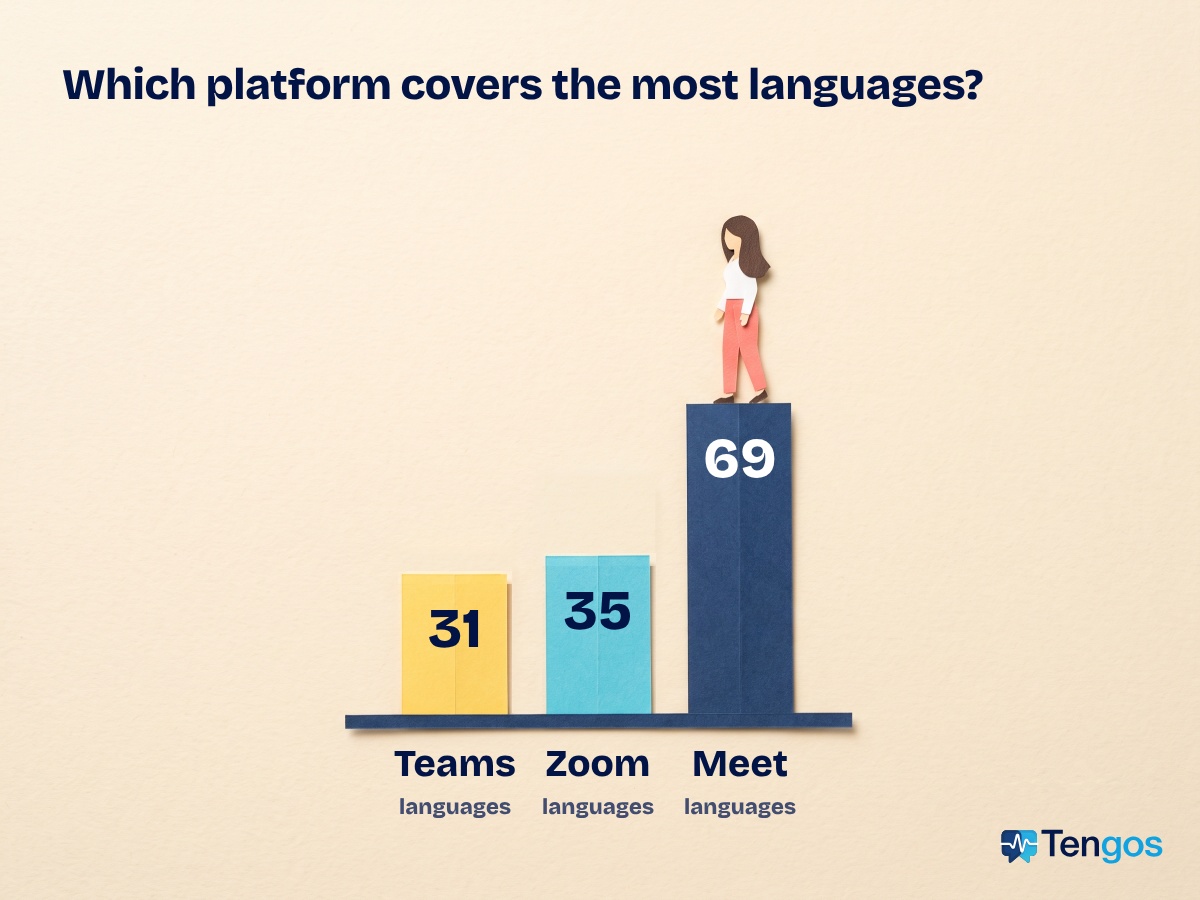
- Zoom: live meeting translation through Translated Captions in 35 languages (Zoom lists 36 entries; we count Simplified and Traditional Chinese as one language). It is built into the Workplace Business Plus, Enterprise Essentials, Enterprise Plus and Enterprise Premier plans. Other paid plans need the add-on, which Zoom has priced at about US$5 per user per month, and you buy it through Zoom Sales.
- Google Meet: translated captions in 69 languages, only on Google Workspace Business Standard, Business Plus, Enterprise Standard, Enterprise Plus and Google AI Pro for Education. Google’s help page does not mention a separate add-on.
- Microsoft Teams: live translated captions in 31 languages, including Japanese, Korean and Chinese. The feature comes with Teams Premium or Microsoft Copilot, an add-on license that your IT admin hands out.
- The common thread: someone else usually unlocks it for you, either your organization or the meeting host. If you only have a free personal account, you will struggle to turn it on yourself.
Live meeting translation on Zoom, Meet, and Teams: comparison table
The numbers in this table come from each company’s official help page (links at the end of the post). The three platforms update their features fairly often, so open the original page before you buy a plan.
| Zoom | Google Meet | Microsoft Teams | |
|---|---|---|---|
| Feature name | Translated Captions | Translated captions | Live translated captions |
| Languages | 35 | 69 | 31 |
| Japanese, Korean, Chinese | Yes | Yes | Yes |
| Plan or requirement | Workplace Business Plus, Enterprise Essentials, Enterprise Plus, Enterprise Premier, or the add-on | Workspace Business Standard, Business Plus, Enterprise Standard, Enterprise Plus, Google AI Pro for Education | Teams Premium or Microsoft Copilot |
| Separate add-on | Yes, through Zoom Sales (about US$5 per user per month) | Not mentioned on the help page | Yes: an add-on license assigned by your IT admin |
| Who can use it | The host needs a supported plan or the add-on; participants pick their own caption language | Participants on a supported Workspace edition turn it on themselves | If the organizer has the license, every participant can use it |
| Free personal account | Cannot turn it on yourself; you can only see it when the host qualifies | Not on the list of supported editions | Not stated; needs your organization’s license |
Zoom: Translated Captions
So does Zoom offer live meeting translation? Yes, through a feature called Translated Captions. According to Zoom’s setup guide, it covers 35 languages, including Japanese, Korean and Chinese. Each person in the meeting picks the caption language they want to read, and it does not change what anyone else sees.
On cost, the feature is built into Workplace Business Plus, Enterprise Essentials, Enterprise Plus and Enterprise Premier. On other paid plans, Zoom sells a Translated Captions add-on, which Zoom announced at about US$5 per user per month. To get pricing and buy it, Zoom’s guide tells you to contact Sales; it does not describe buying it directly inside your account. The add-on is for paid accounts.
How to set up Zoom’s Translated Captions add-on
- Buy and assign the add-on. The account owner or an admin contacts Zoom Sales to buy the add-on (or uses a plan that already includes the feature), then assigns it to the people who will host meetings.
- Turn on automated captions. In your account settings in the Zoom web portal, enable Automated captions first. Until you do, you cannot enable Translated captions.
- Turn on Translated captions. Then choose which language pairs to allow. Admins can apply the setting to the whole account or to a group of users.
- Use it in a meeting. Participants click Show Captions, click the arrow next to it, turn on Translation, pick a language and save. According to Zoom’s guide to viewing captions in another language, each participant can do this without the host stepping in.
You need the Zoom desktop app for Windows or macOS at a recent enough version, or Zoom on the web. Some accounts in tightly regulated industries, such as healthcare and higher education, may not have the feature yet and need to contact their Zoom Account Executive, the sales rep who manages the account.
In other words, if your company runs a standard Zoom plan and has not bought the add-on, you will not see the option to translate captions, no matter how badly you need it.
Google Meet: translated captions
Google Meet’s live meeting translation works through captions in 69 languages, including Japanese, Korean and Chinese. According to Google’s help page, it is only available on Google Workspace Business Standard, Business Plus, Enterprise Standard, Enterprise Plus and Google AI Pro for Education.
Unlike Zoom and Teams, Google’s help page does not mention a separate add-on. The feature is tied to your Workspace edition: Google says its AI features are being added directly to the Business and Enterprise plans, so customers on supported editions keep using it through their current subscription. If your company is on a lower tier, the likely route is an upgrade.
To try it, open Meet on your computer, go to More options, then Settings, then Captions, choose the language of the meeting, switch on translated captions and pick the language you want to read. Google also notes that the feature is rolling out gradually, so some accounts on a supported edition may not see it right away.
Google changes its plan and language lists quite quickly. Check the latest version on the Google Meet help page for translated captions.
One more Meet feature is worth knowing about, because people mix the two up: speech translation. It is a separate feature for Google AI Pro and Ultra and some Workspace plans, but it only works between English and French, German, Hindi, Italian, Portuguese or Spanish. It does not cover Japanese, Korean, Chinese or Vietnamese, so it will not help with those meetings.
Microsoft Teams: live translated captions
According to Microsoft’s documentation, live meeting translation in Teams comes through live translated captions, which are part of Teams Premium and Microsoft Copilot. The feature translates into 31 languages, including Japanese, Korean and Chinese.
What does “add-on license” mean?
Microsoft calls Teams Premium and Copilot add-on licenses. In plain terms, it is an extra purchase on top of the plan you already have, which unlocks a set of additional features. You do not get it automatically: Microsoft says to contact your IT admin to get a supported license.
There is one upside for people who just attend meetings. If the meeting organizer has a Teams Premium or Copilot license, every participant can use translated captions and the transcript without a license of their own. On the other hand, if only a few individuals hold a license, only those people see the Translate to option. So the practical question is usually “who organizes the meeting,” not “which plan are you on.”
Can you use live meeting translation with a free personal account?
Short answer: very unlikely. All three features are tied to a paid plan or an organization-bought license, so a free personal account cannot switch them on by itself.
- Zoom: a free personal plan does not include Translated Captions. What matters is that the host has a supported plan or the add-on. When they do, participants, even on free accounts, can still pick their own caption language.
- Google Meet: a personal Gmail account is not on the list of supported editions. Google has a separate speech translation feature for Google AI Pro and Ultra, but it only pairs English with French, German, Hindi, Italian, Portuguese and Spanish.
- Microsoft Teams: Microsoft tells you to contact your IT admin for a Teams Premium or Copilot license. The documentation says nothing about personal accounts.
What this means when you are the one attending: you rarely get to decide. The plan is bought by your company, your school or your partner. If they do not switch on live meeting translation, you are still stuck listening in a language you are not fluent in and scribbling notes.
Three situations you will probably recognize
- A meeting with an overseas partner, and you are the guest: the plan belongs to the other side, so you cannot switch it on.
- A webinar or online class: the organizer decides whether to turn on translated captions, and many sessions do not.
- Daily meetings at a company on a standard plan: translated captions may simply not be part of the plan.
When translated captions won’t turn on
If you need live meeting translation and a written record without waiting for someone to buy a plan, a standalone app is worth a look. Tengos converts speech to text, translates it in real time and summarizes it with AI, with support for 60 languages. It records meetings through your web browser and includes automatic translation alongside a meeting recorder, so you do not depend on your Zoom, Meet or Teams plan.
For teams spread across countries, see how Tengos handles global team meetings, and read our post on how AI tools improve global team communication.
Tengos also has mobile apps: download it from the App Store for iOS or from Google Play for Android and use it on your phone right away.
You can start with the Free plan (120 minutes a month) and test it on a real meeting. When you need more hours, paid plans billed annually start at US$2.39 a month (Lite) and US$11.99 a month (Pro, about 40 hours a month); billed monthly they are US$2.99 and US$14.99. Prices exclude tax, so check the latest numbers on the Tengos pricing page.
Frequently asked questions
Can I get live meeting translation on a free Zoom account?
No. Translated Captions is for accounts on a supported plan or with the add-on. That said, if the host has a supported plan or the add-on, participants on free accounts can still pick their own caption language.
How many languages does Google Meet translate?
Google’s help page lists 69 languages, including Japanese, Korean and Chinese, for supported Workspace editions. The list of languages and plans can change.
Does Google Meet have an add-on like Zoom?
Google’s help page does not mention a separate add-on. The feature comes with supported Workspace editions, so if your current plan is not on the list you would need to upgrade.
Does Teams offer translated captions in Japanese, Korean and Chinese?
Yes. Microsoft lists Japanese, Korean and both Simplified and Traditional Chinese among its 31 translation languages for live translated captions, and it requires Teams Premium or Microsoft Copilot.
Can a free personal account use live meeting translation on Zoom, Meet or Teams?
Almost never on its own. All three need a paid plan or an organization-bought license. The exception is joining as a participant: you can use it if the host (Zoom) or the organizer (Teams) has a supported plan.
I’m only a participant. Can I turn on translated captions myself?
It depends on the platform. On Zoom, the host needs a supported plan or the add-on, and then you pick your own language. On Teams, if the organizer has a suitable license, everyone can use it. On Meet, participants on a supported plan can turn it on themselves.
Is live meeting translation as accurate as a human interpreter?
No. Zoom itself notes that translated captions may not be accurate. AI captions help you follow the gist, but for legal or medical meetings, use a professional interpreter and double-check the key points.